Fund your AI wallet from any chain, step by step
Everything an agent buys is paid in USDC on this chain, and you hold something else, somewhere else: ETH on Ethereum, SOL, BTC, a stablecoin on Arbitrum. Pick where your funds are; the app asks the network for a route to USDC here, shows what arrives and what the conversion costs, and you send from your own wallet. It lands on a deposit address that only knows how to forward: the fee to the network, the rest to your AI wallet. Nobody holds your funds on the way.
What you need
- A wallet in the browser, connected to the app (top right). Your AI wallet, the account your agents spend from, is derived from it; the budget page above the card deploys it the first time you set a cap.
- The asset you want to deposit, in a wallet on its own chain, plus a little of that chain's gas.
- The wallet budget page at /agents/budget. On the local
development network
scripts/devstack.sh reviewstarts the deposit service in its direct mode: routes from other chains deliver to Base, so there the card offers the deposit address and Sweep now, the path that is real on every network.
Steps
-
Open /agents/budget and scroll to the card Fund your AI wallet from any chain. Its intro says what it does and what the conversion costs.
-
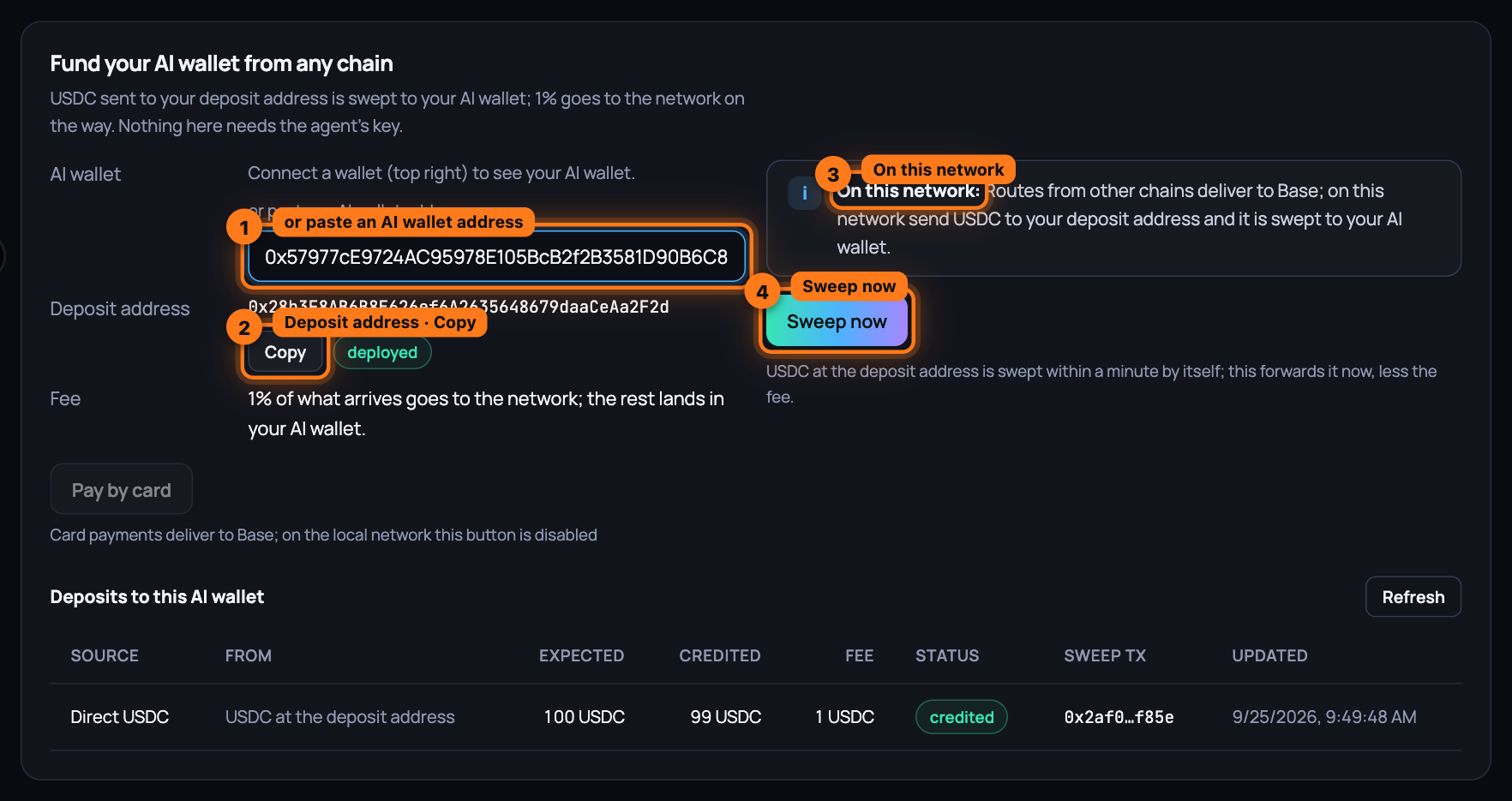
Under AI wallet, see the account your agents spend from. With a wallet connected it is filled in; without one, paste an AI wallet address into or paste an AI wallet address.
-
Read your Deposit address, fixed for your AI wallet on this network. Press Copy to use it anywhere: an exchange withdrawal, a bridge, a friend's wallet. The badge reads deployed on first sweep until the first deposit arrives, and deployed after; funds that arrive before that wait safely. Fee is what the network keeps of what arrives.
-
On a network the route provider delivers to, choose the Source chain you hold the funds on, the Asset (type in the search box to narrow the list; each row shows the symbol and, when known, its price) and the Amount in the asset's own units; the hint under the field shows roughly what it is worth. Press Get a quote: it shows You send, Arrives as (with the least that can arrive), Fee, You are credited and the Route with how long it takes. A quote is good for about a minute; press the button again for a fresh one. Then Send from my wallet: your wallet switches to the source chain, asks you to approve the route for a token (never for the native asset), then to confirm the deposit. When the route starts on a chain the browser wallet cannot sign for (Solana, Bitcoin), the card tells you to send it with
aioum deposit sendor from that chain's own wallet; it is credited the same way when it arrives. The status line reads On its way while the route runs and is checked every five seconds. -
On the local development network, and on any network the route provider does not deliver to, the card reads On this network: Routes from other chains deliver to Base; on this network send USDC to your deposit address and it is swept to your AI wallet. Send USDC to the deposit address from any wallet, then press Sweep now. The service sweeps every known deposit address within a minute by itself; the button forwards it now.
-
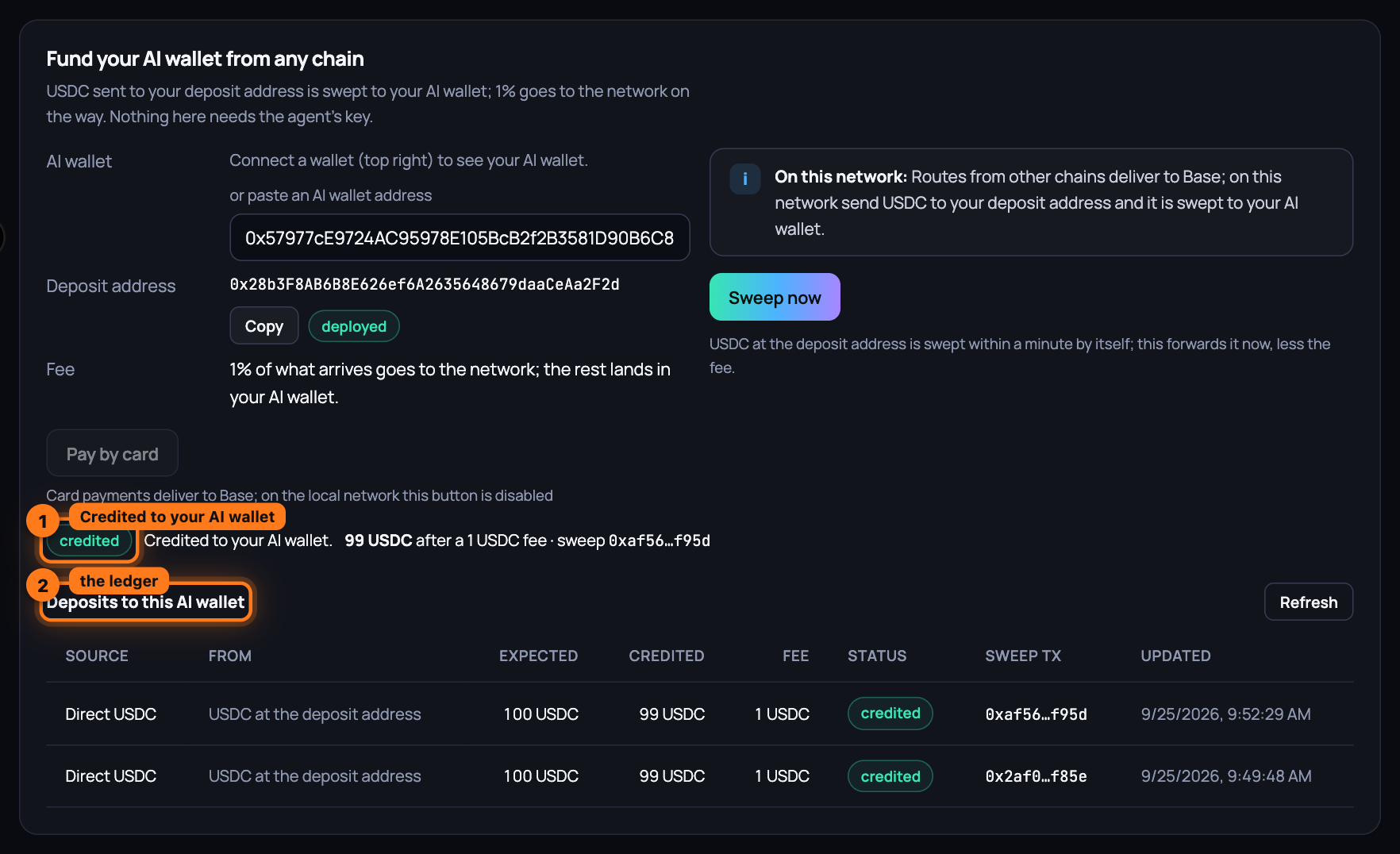
Watch the status line. It reads Credited to your AI wallet with the amount, the fee and the sweep transaction; nothing yet when the deposit address is still empty; The deposit failed carries the route's reason.
-
See every deposit under Deposits to this AI wallet: the source (a route, a plain USDC transfer to the deposit address, or a card payment), what you sent, what was expected, what was credited, the fee, the status and the sweep transaction. USDC that reaches your deposit address by another road is swept within a minute and appears here too; Refresh reloads the table.
Pay by card instead
No crypto to send? Under the deposit address, press Pay by card. When the network's operator holds keys for more than one partner, pick one first: Coinbase Onramp, Transak, MoonPay or Stripe. The partner's page opens in a new tab (if your browser blocked it, the card shows an Open Transak link, or the partner you chose); pay there by card, and the partner delivers USDC to your deposit address on Base. The link is single-use and good for about five minutes. The deposit appears at once under Deposits to this AI wallet as Card → USDC · Transak, pending while you pay, arrived when the partner reports delivery, and credited once the sweep lands it in your AI wallet, less the fee.
The partners deliver to Base only. On the local development network the button is off and the line under it reads Card payments deliver to Base; on the local network this button is disabled; on a network whose operator holds no partner keys it reads No card partner is set up on this network yet.
What you have now
USDC in your AI wallet without ever having held USDC. You sent what you had, from where you had it; the network converted it for the fee it showed, and every step is a transaction you can open. The budget card above sets how much of that balance an agent may spend.
Next: Stake on an operator, step by step — a wallet, an operator, an amount, and the USDC that follows.