Connect local services, step by step
Some of what an agent needs can never be a marketplace listing: the facts it should carry from one run to the next, the files it works on, your email, your calendar, a key to an account that is yours. You wire those into your agents through your private node, under one rule: personal tools run only on your node, as connectors, their secrets encrypted on your disk, and the marketplace never holds an account of yours. Memory and the workspace are yours from the first minute, with no credentials; every tool does the thing it names. Whatever came back from a marketplace step is marked untrusted before it can reach your email or your memory: it never chooses a recipient and never becomes a fact.
What you need
- Your private node, running at
http://127.0.0.1:8770, and its bearer token in~/.aioum-private/token(or the value you set inPRIVATE_NODE_TOKEN). - The passphrase you started it with (
PRIVATE_NODE_PASSPHRASE), or the keyfile the node made in its place at~/.aioum-private/.secretkey: every secret below is encrypted with it. - For Gmail or Google Calendar: a Google OAuth client, its
GOOGLE_CLIENT_IDandGOOGLE_CLIENT_SECRET, withhttp://127.0.0.1:8770/oauth/gmail/callback(and/oauth/gcal/callback) registered as its redirect URI. - For a key-based service: the API key itself and the base URL of the API it belongs to.
- For the workflow step: the local stack, so a marketplace node answers at
MARKET_NODE_URL(defaulthttp://127.0.0.1:8546).
All requests below go to http://127.0.0.1:8770 with authorization: Bearer $TOKEN; set it once:
TOKEN=$(cat ~/.aioum-private/token)
Steps
-
See what the node offers.
GET /connectionslists every connector withconnectedand its tool names:workspace(a folder on your machine your agents work in),hf,hardware,train,skillsandmemory(the local brain), connected from the start;gmail,gcal,apikey,wallet,exchange, the OAuth accounts andghost, which connect below.GET /healthshows the same list without a token (names only, never secrets). The marketplace page shows the same connectors as cards under Your node, each with Connect or Install; every step below has its button there.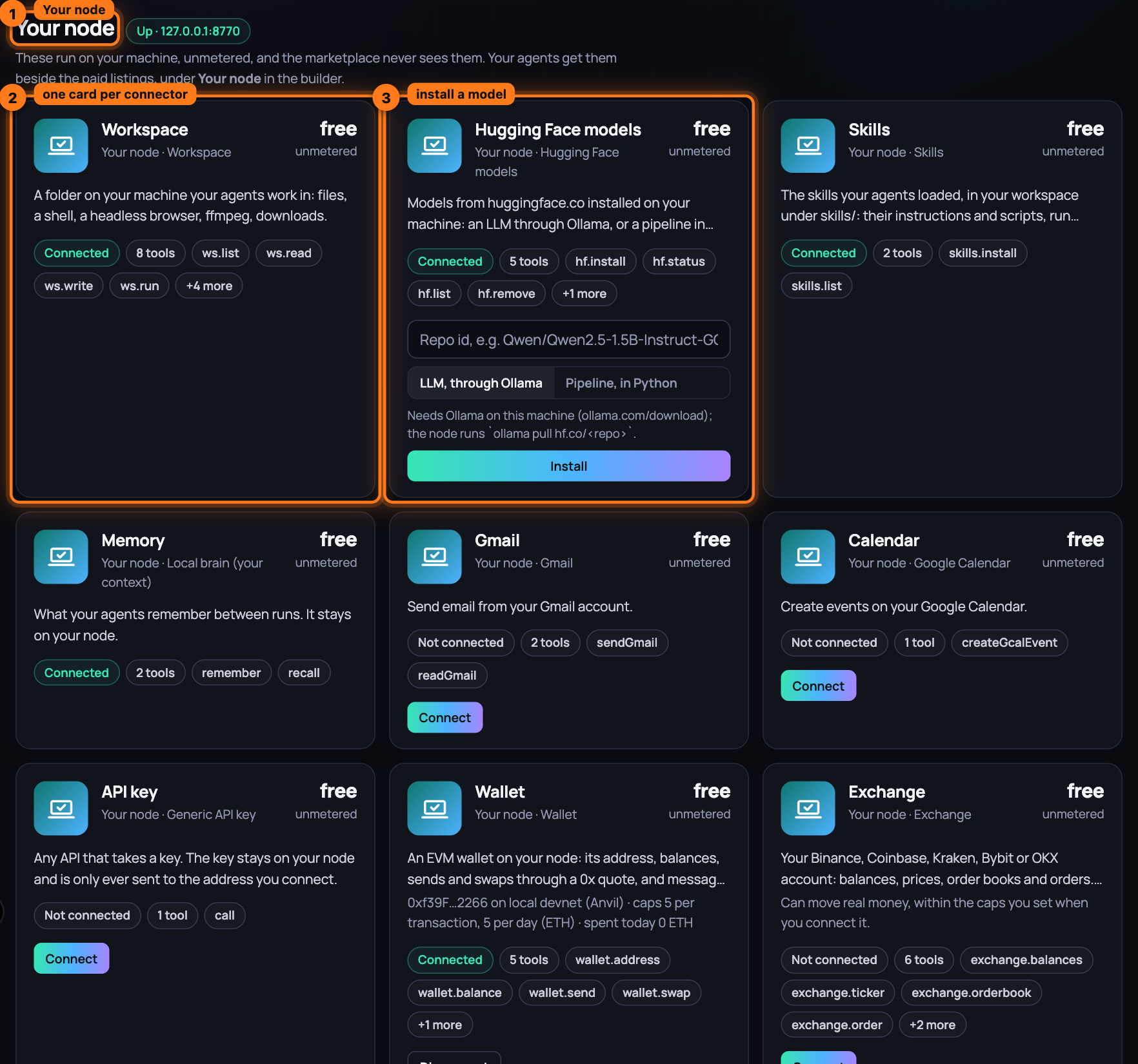
-
Put a file in the workspace and read it back. Tools are called with a
tools/callrequest onPOST /mcp;ws.writeandws.readbelong toworkspace, whose root is~/.aioum-private/workspace(PRIVATE_NODE_WORKSPACE).curl -s -X POST http://127.0.0.1:8770/mcp -H "authorization: Bearer $TOKEN" \ -H "content-type: application/json" -d '{"jsonrpc":"2.0","id":1,"method":"tools/call", "params":{"name":"ws.write","arguments":{"path":"hello.md","content":"hi"}}}'The reply's
result.content[0].textis the file's workspace path, its URL on the node and its size in bytes; the same call with"name":"ws.read"and{"path":"hello.md"}returns its content. That is the whole loop: a tool ran on your machine, a file exists on your disk, nothing was paid, nothing left the box.tools/liston the same route shows every tool you can call now;ws.list,ws.run,ws.fetch,ws.screenshot,ws.browseandws.ffmpegare the rest of the workspace (Your node). -
Connect Gmail or Google Calendar. Set
GOOGLE_CLIENT_IDandGOOGLE_CLIENT_SECRETin the node's environment, restart it, thenPOST /connect {"provider":"gmail"}(without those two values it answers501 OAuth not configured). The reply is anauthUrlonaccounts.google.com: open it in your browser and approve. The node asks only forgmail.send(forgcal,calendar.events) plus offline access, so it receives a refresh token; Google sends your browser tohttp://127.0.0.1:8770/oauth/gmail/callback, the node exchanges the code for tokens, stores them encrypted, and the tab reads "Connected gmail. You can close this tab." NowsendGmail(to,subject,body) and, after the same steps with{"provider":"gcal"},createGcalEvent(title,time) appear intools/list; call them as in step 2.sendGmailsends through the Gmail API from your account and answersGmail: sent to … (message <id>);createGcalEventcreates the event on your primary calendar (timeis an ISO date-time,minutesits length, 60 when unset,descriptionoptional) and answers with the event's link. The node refreshes an expired access token by itself. If you revoke the grant at Google, the next call fails withgmail: re-connect required; if Google refuses the token, the reply says so and tells you to re-connect. Either way, repeat this step. -
Connect a key-based service. Any API that takes a key goes through
apikey:POST /connect {"provider":"apikey","apiKey":"sk-your-key","baseUrl":"https://api.example.com/v1/"}answers{"ok":true,"connected":"apikey","baseUrl":"https://api.example.com/v1/"}. The key goes in theAuthorizationheader asBearer <key>; add"header":"X-Api-Key"and"prefix":""to the same body when the API wants it another way. Its one tool,call, takespath(resolved against the base URL, soweather?city=Oslobecomeshttps://api.example.com/v1/weather?city=Oslo), an optionalmethod(GET when unset) and an optional JSONbody; it answers with the status line and the reply's first 4,000 characters. The key is only ever sent to the origin you connected: a path that resolves anywhere else is refused before any request is made. -
Give the node a memory, then recall it. Your own writes go to
POST /memory, as in{"text":"I prefer window seats","kind":"preference","tags":"travel"};kindmay befact,preference,resultornote, andtagsis a comma-separated string.GET /memorylists everything, newest first. Recall is a tool of thememoryconnector: sendtools/callwith"name":"recall"and"arguments":{"query":"window seats","limit":"5"}as in step 2, and the text comes back as• [preference] I prefer window seats. Its other tool,remember(text,kind,tags), is how a workflow writes; it answersremembered (note): "…"and only ever writes a note.DELETE /memory/<id>forgets one item;POST /forget-allwipes the brain. -
Connect a wallet or an exchange, with caps.
POST /connect {"provider":"wallet", "privateKey":"0x…","chainId":8453,"rpcUrl":"https://…","maxPerTxUsd":50,"maxPerDayUsd":200}(or"mnemonic"in place of the key) stores the key encrypted and answers with the address, the chain and the caps;{"provider":"exchange","venue":"kraken","apiKey":"…","apiSecret":"…", "maxPerTxUsd":50,"maxPerDayUsd":200}does the same for Binance, Coinbase, Kraken, Bybit, OKX or Alpaca (passphrasefor OKX;"passphrase":"live"for Alpaca's live account, paper otherwise). A cap of 0 refuses every spend; a refusal names the cap and today's total, and the day resets at 00:00 UTC. The tools,wallet.send,wallet.swap,wallet.execute,exchange.orderand the rest, are in Your node. -
Connect an ad, analytics or publishing account. Make an OAuth app at the provider with the redirect URI
http://127.0.0.1:8770/oauth/<provider>/callback, thenPOST /connect {"provider":"googleads","clientId":"…","clientSecret":"…","developerToken":"…"}(each provider's fields are what its card on the marketplace page asks for) answers anauthUrl: open it, approve, and the tokens land encrypted on the node and renew themselves. The same foryoutube,ga,gsc,tiktokads,redditads,snapads,hootsuiteandxads;ghosttakes the site's admin URL and Admin API key. Their tools are named per provider (googleads.search,xads.campaigns,ghost.publish…), andoauth.call {provider, method, url}reaches any endpoint with the account's token. -
Wire a workflow that feeds a marketplace step into a local one. A workflow is a list of steps, and one field decides where each runs: a
categorythat starts withpersonal:runs on your node, where thetoolis looked up by name among your connected connectors (personal:memorywithrecallis the one step the node treats as reading your private memory; any otherpersonal:name is a local step); any other category is a marketplace listing, matched against the marketplace's catalogue and paid from the job's budget (serviceIdpins one node,maxPricePerCallcaps its price). An input is a literal or a reference to an earlier step's output,{"kind":"ref","fromStep":0,"extract":"text"}. Create the job onPOST /scheduleand fire it once withPOST /schedule/<id>/run:curl -s -X POST http://127.0.0.1:8770/schedule -H "authorization: Bearer $TOKEN" \ -H "content-type: application/json" -d '{"name":"trending to memory","intervalSeconds":3600, "budgetUsd":1,"steps":[{"id":"s1","category":"mcp:web-search","tool":"search", "inputs":{"query":{"kind":"literal","value":"most trending stock today"}}}, {"id":"s2","category":"personal:memory","tool":"remember","inputs":{ "text":{"kind":"ref","fromStep":0,"extract":"text"},"kind":{"kind":"literal","value":"fact"}, "tags":{"kind":"literal","value":"stocks"}}}]}'The reply is the job, with its
id; the run returns it again withruns[0]:ok,spent, and one output per step. Step 1 was paid on the marketplace with a signed receipt; step 2 ran on your node for free and kept that answer. Marketplace output is tagged untrusted, and two sinks refuse it. Here it landed as anotealthough the step asked for afact, taggeduntrusted:step0; only your ownPOST /memorycreates a fact or preference. Reference it into a recipient field,sendGmail'stoonce Gmail is connected, and the run stops withuntrusted recipient blocked: step 2 field "to" derives from a untrusted source; recipients must be literal or local. The mirror rule: arecalloutput is sensitive, and a paid step receives it only with"allowContextEgress":trueand underPRIVATE_NODE_MAX_EGRESS_BYTES(4096). -
Know where the secrets live, and rotate or remove one. Every token and key sits in
~/.aioum-private/secrets.enc(PRIVATE_NODE_DIR), AES-256-GCM under a key derived fromPRIVATE_NODE_PASSPHRASE, or from the generated.secretkeywhen you set none; the brain ismemory.jsonin the same folder, under the same key. To rotate a key, run step 3 or 4 again: the new secret replaces the old one. To remove one,POST /disconnect {"provider":"apikey"}. To rotate the node's own token, delete~/.aioum-private/tokenand restart (or setPRIVATE_NODE_TOKEN). There is no re-key: a changed passphrase means reconnecting every account, so keep it, and keep an encrypted backup withBACKUP_PASSPHRASE=... npm run private-node:backup -- export ./aioum-backup.bin.
What you have now
Your agents act as you without anyone else holding you: a memory, a workspace, email, calendar, a keyed account, a wallet and an exchange within caps you set, and your ad and analytics accounts all answer on your node, every secret is encrypted on your disk, a workflow hands a paid answer to a local tool, and marketplace bytes never pick who gets the email or what you believe.
Next: From the command line — the same six walkthroughs as commands, one per step, for scripts and servers.