Pick up a pipeline, step by step
A job with several steps and several specialists, built in one click: a few agents that hire one another, a project with a stage per step, a schedule when the work never ends. Each pipeline is built from what is live on the marketplace and connected on your node, says what it still needs, and refuses to build until those parts are there. The budgets are yours: Use this asks for them, and nothing is filled in.
What you need
- The app, open at /agents, with the local development network
running (
scripts/devstack.sh review). - A model that plans: a planner listing on the marketplace, a local Ollama beside the runner, or a key on it. Every pipeline agent is an assistant.
- Your private node, running, with its token at hand for the runner (
~/.aioum-private/token): every pipeline writes into its workspace. - For Research and writing, nothing else: it runs on the keyless listings the local network starts with. The others each name a listing to add, an account to connect or a program to install; the card says which.
Steps
-
Open
/agentsand press Or start from a ready-made pipeline under the box. Two rows: Pipelines, the networks, then Agents, one agent each. Each pipeline card carries its group (Content, Growth, Research, Web, Everyday, Trading), how many agents and stages it has, on a schedule when it keeps going, Needs a GPU on the video, image and training pipelines, and Ready or N missing. Under the description, the line Agents: lists them in hiring order, arrow by arrow:Researcher → Writer. -
Open What it needs on a card (it is open already on a card that is not ready). One line per part, each marked ready, optional or missing:
- a ready listing names the services it picked (
Books, Wikipedia, Arxiv); a ready connector names the tools (ws.list, ws.read, ws.write, ws.run, ws.fetch); - a missing listing reads
list one on Earn (256 templates), a link that opens Earn with a template of that kind pre-filled, thenin .env: FAL_KEY= HF_TOKEN= REPLICATE_API_TOKEN=, the keys those templates need, with where to get them linking the keys page; - a missing connector links Your node with the words to act on,
connect gmail under Your node; a missing program readsinstall ffmpeg beside your private nodewith how; - the GPU line on the video, image and training pipelines reads
a GPU for frame analysis and rendering · your node's own: Apple M4, 32 GB unified memorywhen your node has one, the compute listing's name when acompute:gpulisting that runs jobs serves instead, andnone on this machine; add a compute key (RUNPOD_API_KEY, …) to rent one, or run the node on a machine with a GPUwith rent one on Earn when neither is there; - an optional part adds
without it, …: what the pipeline does instead.
The foot of the card reads what one run costs at today's prices:
one run about $0.1140 · 8 paid calls. It is information, not a budget. A card with a missing part has Use this greyed out, and its tooltip repeats the list.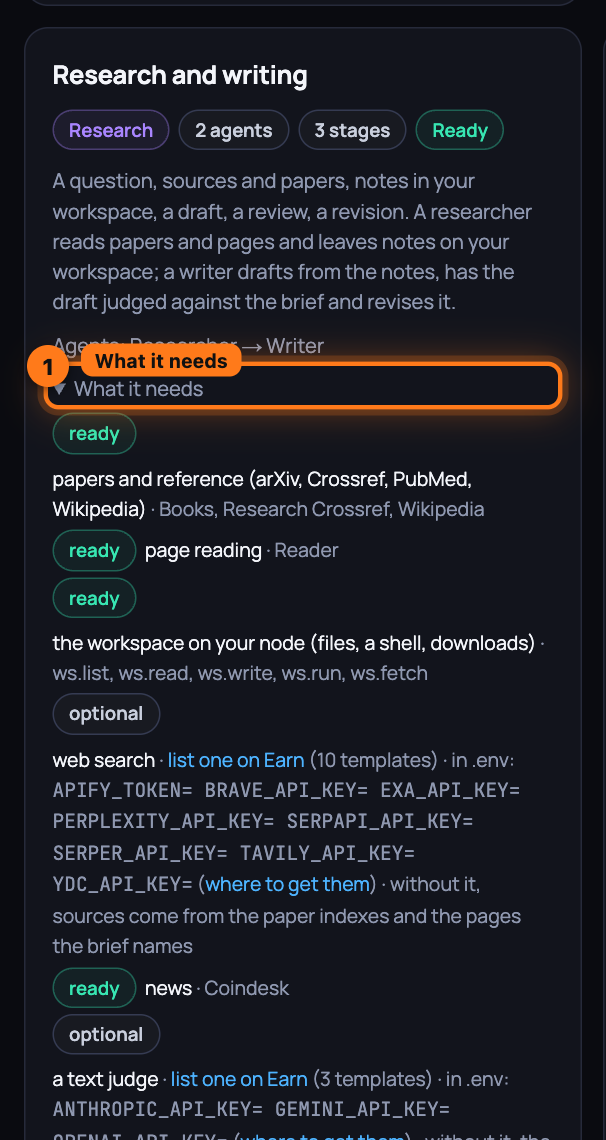
- a ready listing names the services it picked (
-
Press Use this on Research and writing. The card asks for the budgets, empty until you type them: Project budget (USDC), which each stage may spend what is left of, and one cap (USDC) per agent, Researcher and Writer, its lifetime cap and its cap per run. Create stays off with Set the budget you are willing to spend until every number is there. Then the runner creates the agents in hiring order: the Researcher is published as a listing at $0.10 a call, so the Writer can hire it; the Writer gets that listing among its tools, next to the workspace. Then the project is created on the Writer, with the pipeline's sample brief and your budget. Publishing registers the listing on-chain and waits for the directory to mark it live, so the button reads Creating… for up to a minute.
-
A panel opens above the cards: Research and writing is ready, then
2 agents, one project with 3 stages on Writer. On the left, Agents, in hiring order:Researcher · published, $0.1000 per callandWriter · hires Researcherwith a lead badge, each a link to its page. On the right, Project · Research and writing · budget $1.00 (the number you typed) and the stages: Sources and notes, Draft, Review and revise, then the brief. Change any agent on its page first if you like: instructions, tools, budget, all editable like any agent you built. -
Press Start. The project starts, and for a pipeline on a schedule the lead's schedule is switched on at the same time. The page moves to the Writer's page, where Projects shows the project Running with Stage 1 of 3, and the run log fills in: Paid Research Writing · researcher is the hire, with the Researcher's own run nested under it, its paper searches and page reads each a paid call with a receipt, and the notes it wrote to the workspace as links. Open the lead agent goes to the same page without starting.
-
Try a card that is not ready. On the local development network Video and animation production shows Needs a GPU and 3 missing:
video generation, two services to compare · list one on Earn (379 templates) · in .env: FAL_KEY= REPLICATE_API_TOKEN=,text-to-speech · list one on Earn (81 templates)andan image judge · list one on Earn (3 templates) · in .env: GEMINI_API_KEY= OPENAI_API_KEY= OPENROUTER_API_KEY=; on a Mac with an M-series chip the GPU line readsready · a GPU for frame analysis and rendering · your node's own: Apple M4, 32 GB unified memory, and on a machine without a GPU and without a compute listing that runs jobs it readsmissing · … none on this machine; add a compute key (RUNPOD_API_KEY, …) to rent one, or run the node on a machine with a GPU. Add a key to.env, restart the stack, and the listing appears live; the card turns Ready on its next refresh. -
Wire your own. The Custom card at the end says how: publish an agent on its page, then under Advanced in the builder's Its services step tick it under Hires · your published agents for the agent that should call it, tick a judge under Judges · score candidates against a brief, set a schedule under Its budget, and create a project on the last agent with one stage per step.
What you have now
A network of two agents built in one click: a researcher published as a service, a writer that hires it, a project that runs the whole job stage by stage on the writer, every paid call with a receipt on its page, and the notes and the draft in your workspace. The cards that are not ready tell you exactly what to add, and link to where.
Next: Connect local services, step by step — the tools that cannot live in a public marketplace, wired to your agents from your private node.